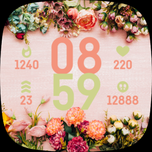
Fitbit watch face
Flower Dream
Unlock this clock face for just a one time payment of 1$ via k-pay. Save over 90% by purchasing this clock face with a bundle, tap here -> 🎁🎁 http://bit.ly/2mS8w9R 🎁🎁 Enjoy other awesome clock faces, tap here -> https://gallery.fitbit.com/search?terms=TopClockFaces 🔹 12h and 24h format support 🔹 Easy to install 🔹 Small file size 🔹 Battery efficient 🔹 Available for versa 2, versa & versa lite 🔹 Fast Support 💬 Send me Feedback or improvement proposal via E-Mail: [email protected] Background designed by: https://www.freepik.com/freepik tags: black, white, flower, flowers, elegant, romantic, floral, watercolor, rose, roses, iris, orchid, anemon, violet, sunflower, orchid, gerbera daisy, lilie, tulip, gold, romantic, winter, love, leaf, circle, cute, pink, dream
Compatibility and pricing are available in the official store.
How to install
- Open Google Health (formerly Fitbit), tap Connections, select your Fitbit and open Watch faces.
- Browse the Clocks tab. Select a compatible clock that is still available for installation, review permissions and let it sync to the watch.
Google has announced that new installs and updates for third-party Fitbit clock faces end on November 28, 2026. Faces you already installed can keep working, but you cannot reinstall them after deleting them or factory-resetting the watch.