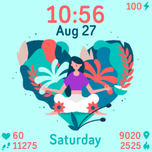
Fitbit watch face
Flower 25
Payments are accepted via PayPal, credit card, and Apple Pay, but non-PayPal payments will incur fees.
Compatibility and pricing are available in the official store.
Key features
- ** NOTICE ***
- ** ABOUT PAYMENT ***
How to install
- Open Google Health (formerly Fitbit), tap Connections, select your Fitbit and open Watch faces.
- Browse the Clocks tab. Select a compatible clock that is still available for installation, review permissions and let it sync to the watch.
Google has announced that new installs and updates for third-party Fitbit clock faces end on November 28, 2026. Faces you already installed can keep working, but you cannot reinstall them after deleting them or factory-resetting the watch.
The Flower collection
3 Fitbit watch faces share this design family.
New

New

New
New